GenClean Review: A Privacy-First Image Toolkit That Never Uploads Your Files
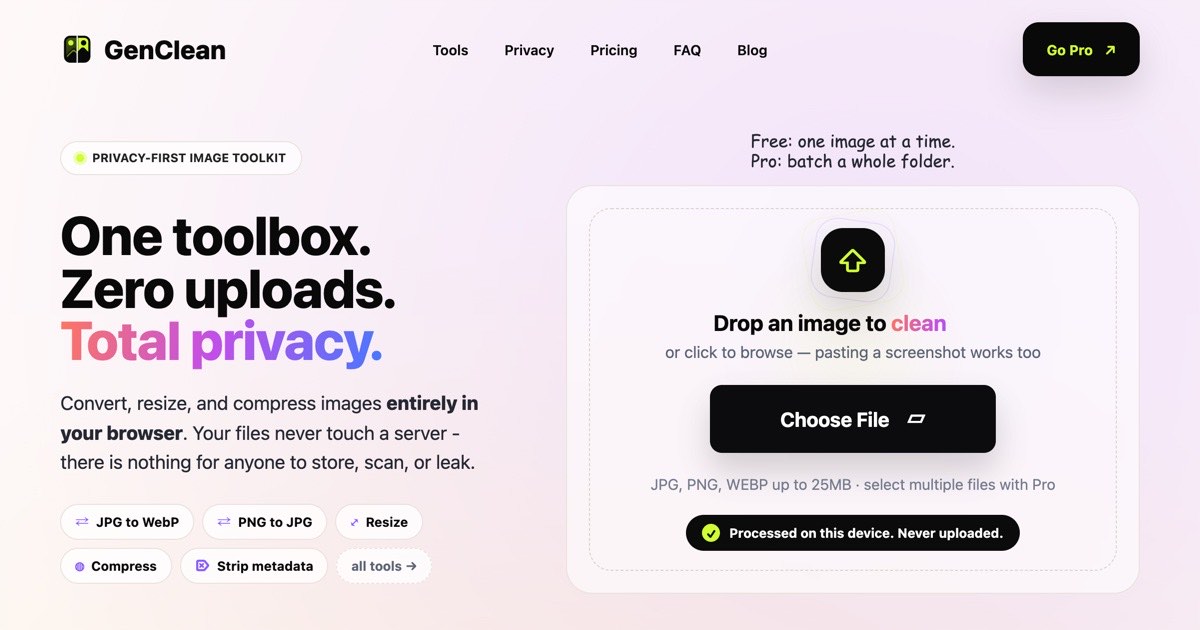
GenClean is a browser-based image toolkit with 15+ tools including converter, compressor, metadata cleaner, background remover, and HEIC converter. Files never leave your device. Free forever for single images; Pro is $9 lifetime.
Most online image tools process your files on a server you do not control. Your photos, documents, and screenshots get uploaded, handled by someone else's infrastructure, and stored in ways you cannot verify. GenClean takes the opposite approach: every tool runs entirely inside your browser. Your files never leave your device, which means there is nothing for anyone to store, scan, or leak.
What GenClean Does
GenClean is a privacy-first image toolkit with 15+ tools covering the most common image tasks: converting between formats, resizing, compressing, stripping metadata, removing backgrounds, converting iPhone HEIC photos, cropping, rotating, converting PDFs to images, and more. All of it runs locally in your browser using WebAssembly and browser APIs, with no server involved at any stage.
The free plan covers every tool for single files with no account required. Pro unlocks batch processing, ZIP export, larger file limits, and removes ads, for a one-time $9 lifetime payment.
Tools Included
Format conversion: JPG to PNG, PNG to JPG, JPG to WebP, PNG to WebP, WebP to JPG, WebP to PNG, and a general Image Converter that handles any supported format combination. Useful for reducing file size for the web, preserving transparency, or getting files into formats that old apps or email clients will accept.
Image Compressor: Reduces file size with a live before/after readout so you can see exactly how much you are saving before downloading. No guesswork on quality settings.
Image Resizer: Resize by exact pixel dimensions, percentage, or social media presets. Useful for preparing images for specific platforms without loading a full design tool.
Metadata Cleaner: Strips GPS location, device info, and hidden EXIF data before sharing an image. Particularly important for photos taken on a phone, which embed exact location coordinates by default.
HEIC to JPG: Converts iPhone photos to JPG without a cloud service. HEIC files from iOS do not open in most apps by default; this tool handles the conversion locally in seconds.
Background Remover: AI-powered background removal that runs directly in the browser. The model runs on your device, so even this feature never uploads your image.
Blur Face / Region: Blur specific areas of an image before sharing, useful for obscuring faces, license plates, or sensitive information in screenshots.
PDF to Image: Converts every page of a PDF into a crisp PNG or JPG. Image Cropper, Rotate & Mirror, EXIF Viewer, and Image to PDF round out the toolkit.
Pricing
The free plan gives you access to every tool for one file at a time, with no account required and no expiry. It is ad-supported.
Pro costs $9 as a one-time lifetime payment (launch price; regular price is $29). It adds batch processing across every tool, one-click ZIP export of processed files, no ads, larger file size limits (up to 25MB per file on free; higher on Pro), and every future Pro tool as it ships. A desktop app is also in development for Pro users. Licenses work on up to five devices.
Checkout runs through Dodo Payments with a 14-day money-back guarantee. There is no subscription, no per-file credit system, and no expiry on the license.
Who Should Use GenClean
Anyone handling sensitive images - medical photos, legal documents, personal photos, client files - where uploading to a third-party server is not acceptable.
Developers and designers who regularly convert between formats or optimize images for the web and want a fast, no-friction tool without cloud dependencies.
iPhone users dealing with HEIC files that won't open in Windows apps, email clients, or older software.
People preparing images for social media who want to strip location metadata before posting photos taken on a phone.
Anyone who needs batch processing - the Pro plan handles entire folders at once and exports them as a ZIP, which is significantly faster than processing files one by one.
Frequently Asked Questions
Do files really never leave my device?
Yes. GenClean runs every tool using browser APIs and WebAssembly. Your files are processed entirely in your browser tab and are never sent to a server. This applies to both the free plan and Pro, including the AI-powered background remover.
Is the free plan really unlimited?
Yes, for single files. Every tool is available on the free plan with no account, no daily limit, and no expiry. The only restriction is that you process one file at a time. Pro unlocks batch processing for when you have a folder of files to handle at once.
What does the $9 Pro lifetime license include?
Pro includes batch processing across every tool, one-click ZIP export, no ads, larger file size limits, every future Pro tool as it ships, and a desktop app currently in development. The license works on up to five devices and is a one-time payment with no subscription or renewal.
What image formats does GenClean support?
GenClean supports JPG, PNG, WebP, HEIC, and PDF as inputs, with conversion tools covering all common format combinations. The Image Converter handles any supported format pair in one step.
Why would I use GenClean instead of an app like Photoshop or Preview?
GenClean covers the routine tasks (compress, convert, resize, strip metadata, remove background) that do not need a full image editor but that most people end up opening one for anyway. It is faster for single-purpose tasks, works on any device with a browser, and requires no installation or subscription. For complex editing, a full editor is still the right tool.